Credits and billing in Ohanvi
Ohanvi runs on prepaid credits. You add money to your account, it becomes credits, and each paid action takes a little from that balance. The Credits page shows what you have, what you used, and every rupee in and out.
What credits are
- 1 credit = ₹1.
- Credits are prepaid. You add them first (a recharge, also called "add funds"), and charges come off the balance as they happen.
- Credits are spent on WhatsApp messages, extra usage, email and AI.
- Credits stay valid for one year from the date they are added.
- 18% GST is charged when you recharge, not when you spend. See Add funds to your account.
Messages inside a customer chat
When a customer messages you, WhatsApp opens a 24-hour window. From 1 October 2026, Meta charges for some messages sent inside it:
| Message | What is charged |
|---|---|
| Replies inside the window, typed by your team or sent by a bot | The first 1,000 each calendar month are free. After that, Meta's rate for each one, which is 11.5 paise in India. |
| Utility templates sent inside the window | Meta's rate from the first message, 11.5 paise in India. |
| Conversations started from a Click-to-WhatsApp ad | Still free for the whole 72-hour window. |
While a chat's window is open, its header shows how many of those free messages are left this month on that WhatsApp number, for example 844 of 1,000 free left. It goes down as messages are sent.
This is Meta's charge, not ours
These charges are Meta's. We add no markup on them: the amount taken from your credits is Meta's rate and nothing more. If a bot sends the message, your plan's automated message allowance and rate still apply as they do today.
AI in the inbox
Speak and translate in the WhatsApp inbox takes these amounts from your credits:
| Action | What is charged |
|---|---|
| Speech (speaking a reply) | ₹1.50 per started minute of recording. |
| Voice note (your reply spoken back in the customer's language) | 1.5 paise per character, charged when the voice note is made, even if you discard the preview. |
| Text translation | 20 paise each: a draft, or a message into one language. A message is charged the first time only; reopening it is free for your whole team. |
Nothing is charged when no speech is heard, when the AI fails, or when the text is already in that language. Rates can differ on custom plans. See Speak and translate in the inbox.
Google Reviews
Your Google review page is paid from your credits at these prices:
| Action | What is charged |
|---|---|
| AI review drafts (a customer taps Write my review) | ₹5 + GST per request that returns drafts, up to 3 drafts. Free on a branch with the Google Reviews Annual Pack. |
| Voice input (a customer speaks their review) | ₹3 + GST per voice input (one tap of Speak instead), or ₹2 + GST on a branch with the Annual Pack. Charged whether the customer's phone or our AI turns the speech into text. |
| Google Reviews Annual Pack | ₹1,000 + GST per branch, for 1 year. See Buy the Annual Pack for a branch. |
GST was paid when you added funds, so your credits go down by the price before GST: ₹5, ₹3, ₹2 or ₹1,000. A draft request that returns no drafts costs nothing. Voice input is hidden when your credits can't pay for it. Suggest with AI questions and AI flyer backgrounds are free. See Add-on packs and usage limits.
Before you start
- You are signed in to Ohanvi. See Sign in to Ohanvi.
Open the Credits page
- In the top-right corner, click the Credits box. It shows your current balance, for example ₹0.
-
The Credits page opens.
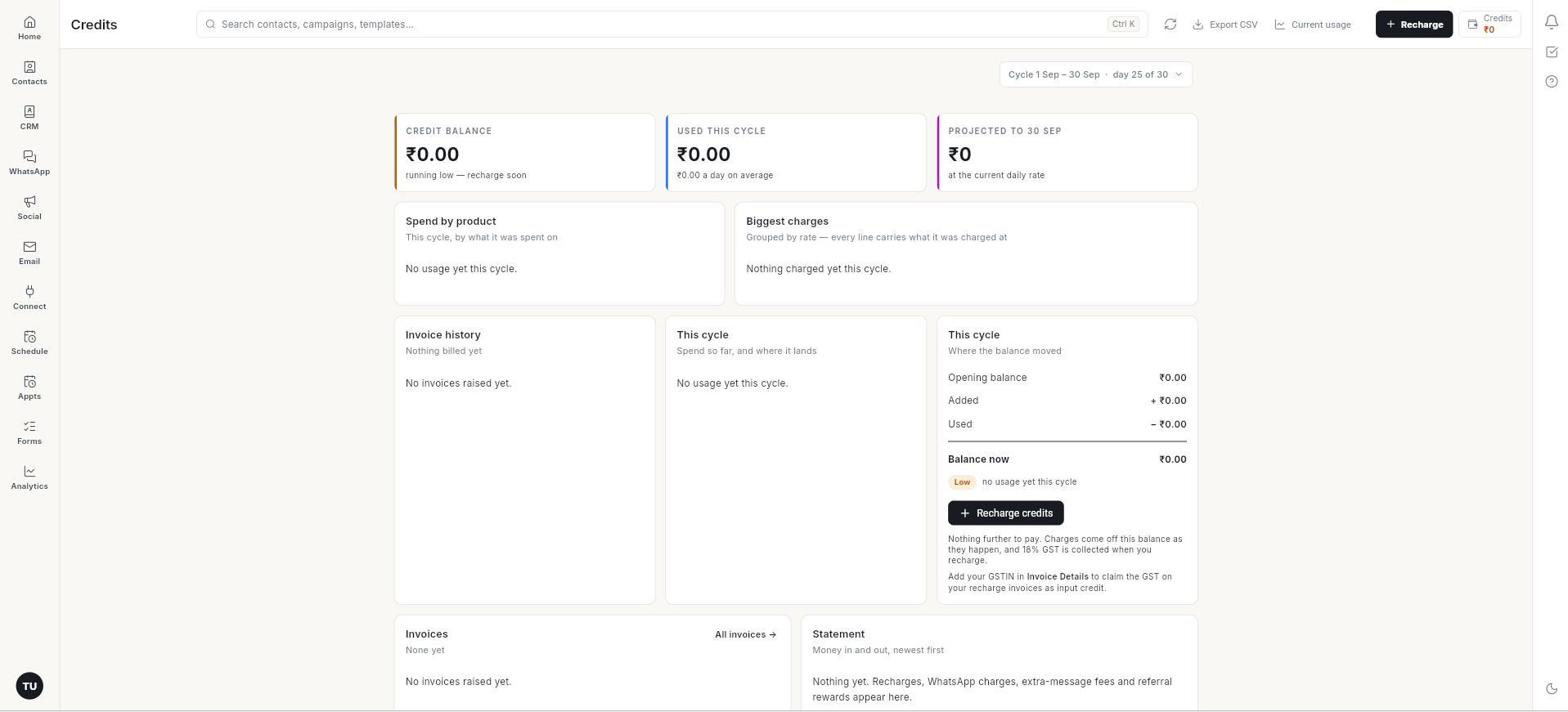
Read the Credits page
| Section | What it tells you |
|---|---|
| Cycle (top right) | The billing cycle you are looking at, for example Cycle 1 Sep – 30 Sep · day 25 of 30. Click it to see an earlier cycle. |
| Credit balance | Credits left right now. Shows running low — recharge soon when the balance will not last the cycle. |
| Used this cycle | Credits spent in this cycle, with the average per day. |
| Projected to [date] | What you will have spent by the end of the cycle at the current daily rate. |
| Spend by product | This cycle's spend split by what it was spent on. |
| Biggest charges | Charges grouped by rate. Every line shows the rate it was charged at. |
| Usage and limits | One bar for each pack and plan limit, such as messages, contacts, team members and storage, with numbers like 250 of 1,000 used. See Add-on packs and usage limits. |
| Invoice history / Invoices | Invoices raised on your account: one for each recharge, plus any plan invoices. Invoice history charts the total billed in each cycle, and Invoices lists the latest ones. Click All invoices to see the full list. |
| This cycle — Where the balance moved | Opening balance, Added, Used and Balance now for the cycle. |
| Statement | Every movement of money, newest first: recharges, WhatsApp charges, extra-message fees and referral rewards. |
The buttons at the top of the page:
- Recharge — add credits. See Add funds to your account.
- Export CSV — download your statement as a CSV file: every movement of money, with its date, description, money in, money out and the balance after it. The button stays grey until there is at least one movement.
- Current usage — see your usage in detail.
Claim GST as input credit
Add your GSTIN in Invoice Details so your recharge invoices carry it and you can claim the GST.
Video walkthrough
[VIDEO]
Troubleshooting
| Issue | Cause | Fix |
|---|---|---|
| Balance shows running low — recharge soon | At your current daily spend, the balance will not last until the end of the cycle. With no spend yet, it shows when the balance is ₹0. | Add funds before your next campaign. |
| No usage yet this cycle | Nothing paid has been sent in this cycle. | This is normal for a new account. Usage appears after your first paid message. |
| No invoices raised yet | No recharge has been made. | An invoice is raised for each recharge. |
| Recharge invoice has no GSTIN | GSTIN was not added before the recharge. | Add your GSTIN in Invoice Details before your next recharge. |